Tampilkan postingan dengan label Get Edutaiment. Tampilkan semua postingan

Minggu, 04 Maret 2012

Mading Masuk Koran 2012 Competition by Radar Banyumas

It's been 3 months since my last post. I'm too busy to post some article and sometimes when I wanna post something i have no idea in what i have to post. But, finally today i could post something fresh. Anyone miss me? :silent Okay, skip hug session.

Today I wanna tell some fun fresh news. Suryakanta 1, actually 10 of Suryakanta 1 members including me joined Mading Masuk Koran 2012 Competition by Radar Banyumas. Unfortunately only 10 of us who could join this competition. But its alright the rest will always support us. Ok, guys?

This competition is about publishing our wall magazine in a newspaper once a month. Its joined by some Senior High School in my region. But, I'm kinda afraid of collusion. Yeah you now, the redaction president's daughter is on one of the participant's school. We kinda worried. But, it doesn't matter we will try hard to win this competition. :whisp "SUCK!"

Before we join the competition, RadarMas asked us to join the tutorial class in STIKES. It was fun. We met our competitor. All of them looks great and smart. The STIKES library amazed us. We embarassed ourselves there. We took some picture of us. These are some of it:


"SILLY!"
"Shut up, Bit*h!"

And then finally on March 1st we published our page. Yeah! Everybody amazed everybody looks so fun everybody support us. Even the newspaper sold out in front of my school. Great! Thank you guys. But the war hasn't over. We have 6 months to go to reach 5 million rupiahs. So guys keep supporting us! Bye!

Jumat, 28 Oktober 2011

Get Your SMADAV PRO


Hallo tomodachingu! Udah pada tau kan apa itu SMADAV? Ya, SMADAV itu antivirus lokal buatan Indonesia. Keren kan orang-orang Indonesia? Kalian jangan ngira kalo SMADAV itu jelek. Kalo kalian ngira gitu kalian salah dan sangat menghina antivirus buatan anak bangsa. Antivirus ini hampir tiap bulan selalu diupdate loh. Sampai saat ini SMADAV sudah mencapai SMADAV 8.7.2. Keren kan.

SMADAV bisa didapatkan secara free di website officialnya (bisa dicari di Google hehe). Selain free ada juga SMADAV Pro. SMADAV Pro bisa didapat jika kita donasi beberapa rupiah ke rekening SMADAV. Tapi kali ini ada cara lain untuk mendapatkan SMADAV Pro. Caranya memang agak rumit (bahkan bisa dibilang rumit). Kalian cuma butuh aplikasi SMADAV free dan kalkulator. Pertama perhatikan kode ASCII berikut ini:

A=65......F=70......K=75.......P=80.......U=85.... ...Z=90
B=66......G=71......L=76.......Q=81.......V=86
C=67......H=72......M=77......R=82.......W=87
D=68......I=73.......N=78......S=83.......X=88
E=69......J=74.......O=79......T=84.......Y=89

0=48......5=53
1=49......6=54
2=50......7=55
3=51......8=56
4=52......9=57

Sekarang kita coba misal dengan nama wirosableng untuk mendapat SN SMADAV Pro (ane pinjem dulu ya gan contohnya SOURCE )
Bismillah dulu yuk...

Jumat, 21 Oktober 2011

Digital Anime Painting with Photoshop II

STEP 1 - THE OUTLINE
Sebelum memulai, buat terlebih dahulu outline-nya di kertas lalu gunakan scanner untuk memasukkan gambar tsb ke komputer (kalau pakai kamera saya saranin sedia panadol juga, soalnya nanti bakal pusing levelingnya ). Ok, setelah itu load gambar tsb di sotosop.
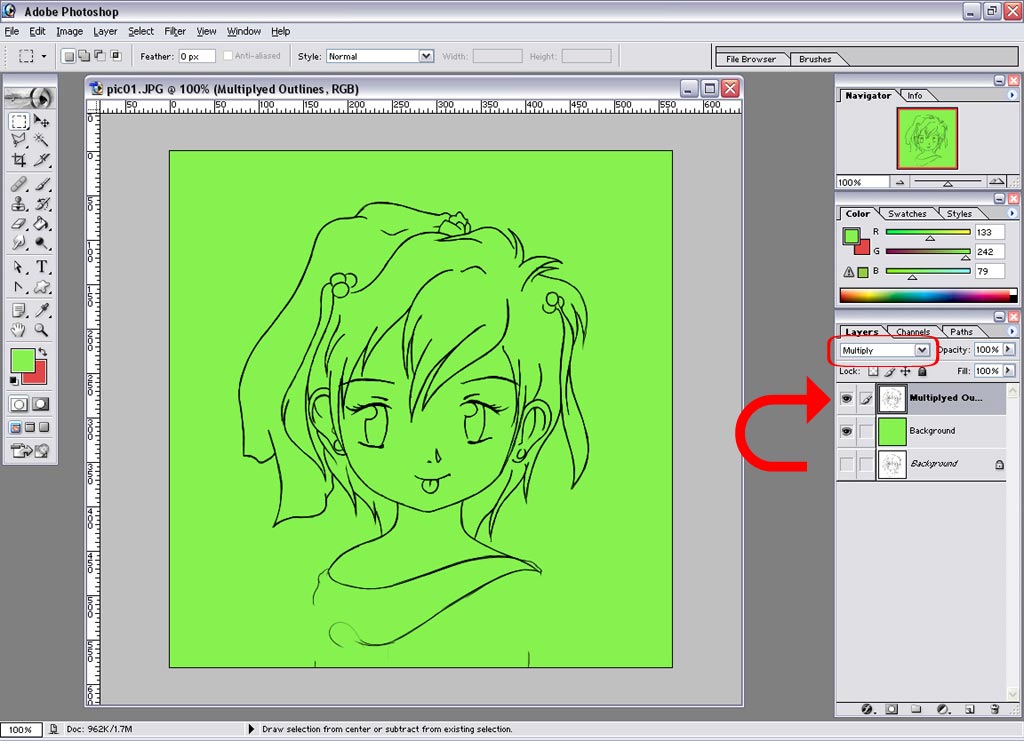
  1. Leveling, (Image > Adjustments > Levels/Ctrl+L) untuk membuat background jadi putih dan outline jadi hitam dan halus. Di sini disebutkan geser slide putih dan hitam ke tengah, tapi tidak menutup kemungkinan kombinasi yang lain lebih bagus, coba2 saja sendiri;
  2. Unlock Background Layer, double-click di background layer lalu klik OK, agar gambar bisa diedit;
  3. Multiply Blending, untuk membuat bagian yang putih transparan.

Senin, 10 Oktober 2011

Digital Anime Painting with Photoshop

STEP 1: Preparing picture for Coloring
Duplicate your outline and choose Multiply for it layer blend mode. Hide the original outlines and create between new layer names it background, and then fill it with any fresh color.


STEP 2: Base Colors
Now we will just use Polygonal Lasso Tool and Paint Bucket Tool. Put in mind that any color should have a layer.
So start selecting using Polygonal Lasso Tool the area that you need, then create new layer and fill the selected area with the color that you want, until you finish the entire picture.
You will use the zoom-in function a lot while selecting areas. Never ever use Magic Wand Tool for making selections!
Twitter Bird Gadget Cool Neon Green Outer Glow Pointer